Minecraft Education Update – supporting coding inside the Game

Minecraft coding update

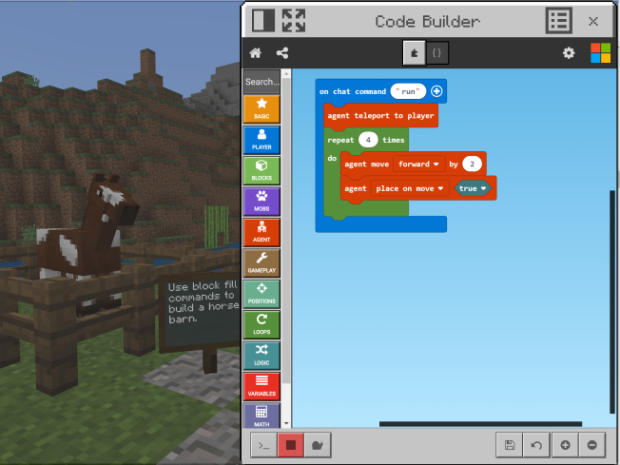
This  release of the updated MEE app now has the Code Connection app directly inside the main MEE app itself – meaning no more toggling between apps.
This means a much improved  user experience when using the Code Connection tool inside the game. Just tap the C key and the coding windows appears.

Coding_Desktop new

What else is part of the Code Builder Update?

  • The Library Beta: You can now search for addition worlds from with in the app rather than having to go to the Minecraft Education Edition Home Page home page.
  • On-screen Control Guide: This help users to move around the screen by showing the controls on screen within Minecraft. These controls will update depending on how you use the game, and you can turn them off in the settings menu once you’re comfortable using the controls.
  • Educator Resources: A link for teachers (you must be logged in as a teacher) to access lessons, training and links to the MEE community.
  • Deep link: provides the option to deep link content in the library to sources outside the game.

Link to the update here.

New Microsoft School Agreement Announced

This is really exciting news for NZ schools.

Link to the full story

Software included in the Agreement
Schools are licensed to use the Microsoft 365 A3 suite which includes: Windows 10 operating system, Microsoft Office 365, Microsoft Enterprise Mobility & Security and rights to the Microsoft server software.
For more information about the 2019-21 Microsoft agreement see the Microsoft Schools’ Agreement Homepage .
A range of new cloud-delivered services and tools are available under the agreement, including Office 365 Pro Plus, the Enterprise Mobility & Security suite and Minecraft Education Edition. This agreement includes expanded Student Use Benefits (SUB) on more products.
Office 365 provides a cloud-hosted suite of Office Productivity software. It allows choice for students’ and teachers’ devices to run Office in the cloud, on the desktop/device or in a hybrid mode where content is synchronized between the user’s device and cloud.
Office 365 Pro Plus includes the latest versions of Access, Excel, Skype for Business, OneNote, Outlook, PowerPoint, Publisher, and Word. Users install the client software onto their own devices and can run up to 5 copies on their computer (Mac/PC) and 5 on their mobile device (Android/iPhone).
Enterprise Mobility & Security enables schools to support mobile computing and Bring your own device (BYOD). It provides tools to manage mobile and desktop devices, applications, security, identity and access rights. It includes: Intune Mobile Device Management (MDM), Azure Active Directory Premium 1, Azure Rights Management and Advanced Threat Analytics.
Minecraft Education Edition is an open-world game that promotes computational thinking, creativity, collaboration and problem solving in an immersive environment. With education specific features such as teacher classroom controls, coding connection and hundreds of curriculum lessons, schools can easily integrate game-based learning into their classrooms. Minecraft Education Edition currently runs on Windows 10 and MacOS.
Updated versions of all Microsoft’s key on-premise software are available: including Windows 10, Office 2016, SharePoint 2016, Exchange 2016, Windows Server 2016, Skype for Business 2015.


OneNote

Absolutely an all time favourite application. As I have often said “My whole life is in OneNote”. Although this is an exageration it is still my go to application and i have witnessed it being used to support teaching and learning in exciting ways.

There are range of OneNote applications and I have long been an advocate of the desktop version. However as of today I am migrating my notebooks to the Windows 10 app version and will be focusing on this version for much of my future Professional Development. I accept that it has still some features missing from the desktop version and I will dip into OneNote 2016 from time to time.
I can appreciate that the Microsoft rationale of having all version of OneNote look the sanme from now on is a good move. I am confident that the promise of all the features we love in the desktop version being incorporated into the app and we will see features never seen in the past.

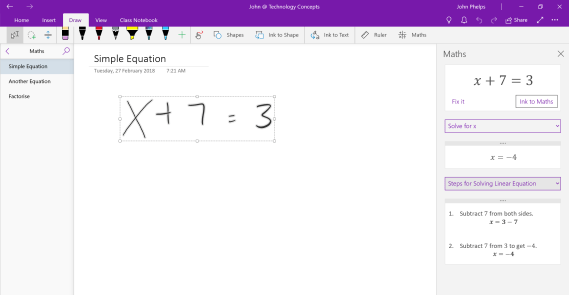
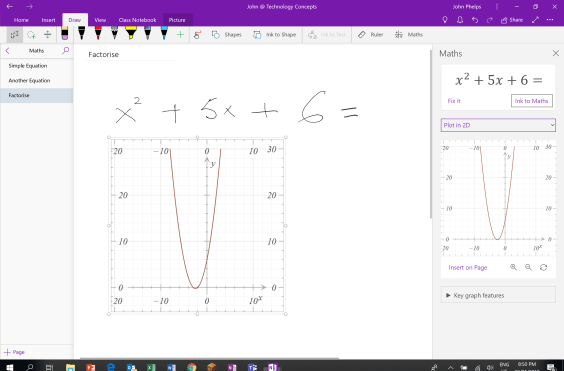
My favourite option so far is ink to maths.

This rather simple example demonstrates the ability to see solution steps for equation solving.

Won1

In example 2 we look at plotting in 2D and inserting the resulting graph on the page giving further ability to notate and explain if desired.

won2

Part of my confidence is based on this Mike Tholfsen – The Future of OneNote in Education

https://vimeo.com/242388447

Other Useful Links

HP Regional Teacher Talks

th

John will be running a number of  HP sponsored regional presenations in August and September.

The first of these is at Takapua School in Central Hawke’s Bay.

In this workshop we will look at a range of programmes that are helping teachers to take advantage of the increasing number of devices that are available to support teaching and learning in your school.

As well as looking at:

  • Immersive reader to support literacy at many levels.
  • Easy video creating
  • Brilliant Creativity through 3D Paint
  • Easy Movie Tutorial Creating

Exploration on how you can incorporate Minecraft: Education Edition into your classroom. Hear stories about Minecraft: EE supporting Computational Thinking for Digital Technologies and Designing and Developing Digital Outcomes.

In this session we will share:

  • Features of the Minecraft Education Edition
  • Curriculum Resources
  • Minecraft Education Edition in teaching and Learning
  • Minecraft and Coding
  • Stories from teachers who have started using Minecraft in their classes.
  • The new chemistry update
  • There will be a number of devices available for you to use or bring your own device.

To help with catering please register:
Registration Link

Other dates and venues:

Feilding
Napier
Wairarapa
Wairoa


Teacher Talks – Teaming Up with Microsoft Teams in Education
18/04/2018 9:00 am
Introduction to Teams for teachers.

Teacher Talks – A Quick Word with John
18/04/2018 10:30 am
A quick fire presentation in which we look at hints and tips for using MS Word based on my Travels and comments such as ” I didn’t know that, how long has this been around.

Teacher Talks – Life in PowerPoint
19/04/2018 9:00 am
Death by PowerPoint has been a common phrase for years. However PowerPoint is still a great application and being enhanced all the time come and take a look.

Teacher Talks – An Introduction to Office 365 for School Administrators
24/04/2018 9:00 am
School Administrators and office workers are often left out of PD. Here is an opportunity for them to see Office 365 based more on their roles rather than from a teaching and learning perspective.

Teacher Talks – Introduction to Minecraft Education Edition
26/04/2018 9:00 am
Introduction to Minecraft Education Edition

Teacher Talks – Introduction to Office 365 for Educators
27/04/2018 10:00 am
Introduction to Office 365. I meet many teachers who did not really understand Office 365 and the features. Here is an opportunity to find out more about it.

Teacher Talks Whanganui Minecraft Education Edition
10/05/2018
Introduction to Minecraft Education Edition.

On the Road again – July August 2018


WP_20131128_004
For 5 and a half years I have constantly been on the road visiting schools and attending conferences from Northland to Southland.  Generally, but not always, I have been to trust various GPS systems.
I am looking forward to less travel and I will keep you posted on my travels.

During the school holidays I was privileged to attend the innaugural Microsoft Innovative Educators Hui at Microsoft in Auckland. As well as mixing with many amazing NZ Educators it was a bonus to meet guest presenters from the USA and Australia. Comgratulations to the organising team. Check out some of the action on  Twitter #NZMIEEHUI18.

_MG_0110_Microsoft_MIEHUI
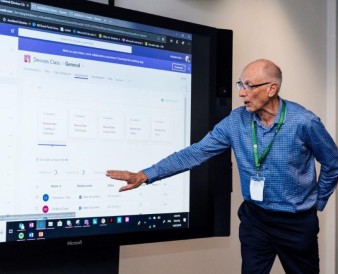
I was snapped co-presenting  with Anne Taylor and Sam MacNeill extoling the virtues of Microsoft Teams.

Recently I have been presenting at the Interfaces Xpos in Christchurch, Palmerston North and Auckland.

HP Presentations

Immersive Reader Presentations

HP Regional Presentations
Central Hawke’s Bay
Thanks to Takapau School for hosting. 41 attendees from 11 schools which was great turn out.